



* The information is current as of the publication date.
Great news for LINEMO users!
By linking your LINEMO mobile network account with PayPay, you can now easily sign up, log in, and top up on the PayPay app.
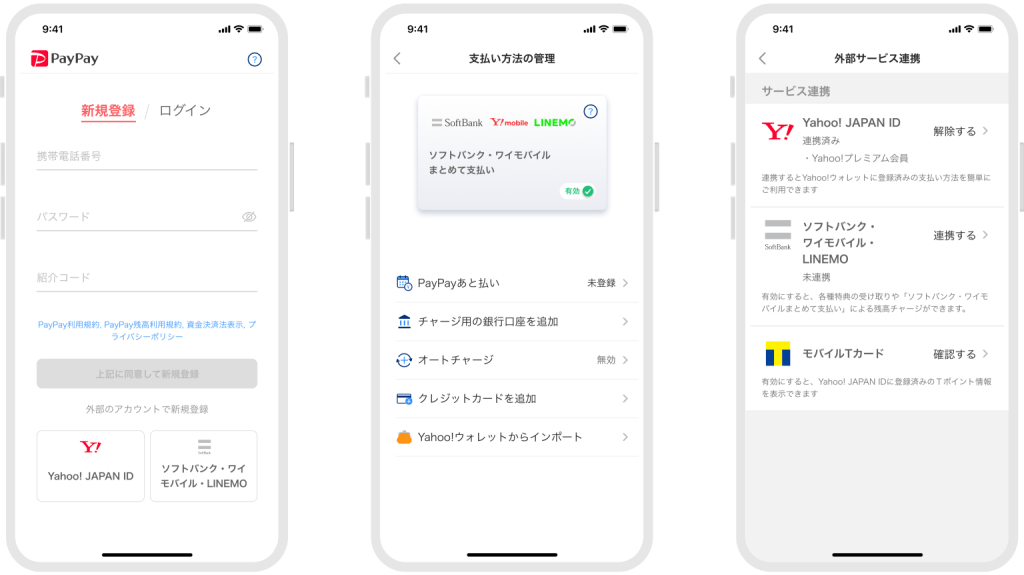
To sign up, simply tap the “SoftBank, Y!mobile, LINEMO” button on the screen to authenticate your mobile line, then enter the four-digit code sent via SMS to create your PayPay account.
For existing PayPay users, logging in and topping up will also become much easier once you link your mobile network to your PayPay account.
You can log in simply by tapping the “SoftBank, Y!mobile, LINEMO” button, without needing to enter your phone number or password on the login screen.
In addition, with a simple setup, you can top up using “SoftBank, Y!mobile Pay on One Bill.” Top-up amounts can be paid together with your monthly LINEMO smartphone bill.
To link your accounts, go to the “Links with External Services” section under the “Account” screen and tap “Link with SoftBank, Y!mobile, LINEMO”.
This feature allows LINEMO users to get started with and use PayPay quickly and conveniently. Give it a try!