



* The information is current as of the publication date.
PayPay is now available online and at a wide variety of merchants, becoming an essential part of daily life for many users.
When using PayPay for payments, you generally need to top up your account balance first.
While you can add funds using cash at Seven Bank or Lawson Bank ATMs, the most seamless method is directly charging from your registered bank account. To register a bank account, users must first complete identity verification (eKYC) on the PayPay app for security reasons.
With the introduction of the Japanese Public Key Infrastructure (JPKI) using My Number Cards, identity verification is now remarkably easy and secure. This feature will initially roll out on Android, followed by iOS devices soon after.
Japanese Public Key Infrastructure Using My Number Cards
Previously, users had to submit multiple photos for verification, including their physical ID documents and facial selfies.
This process required ensuring photos were clear and unblurred, alongside manually entering details such as name and address.
With JPKI implementation, photo submissions are no longer required. The process has been simplified to entering only your signature certificate password and name in kana (with a few selectable options).
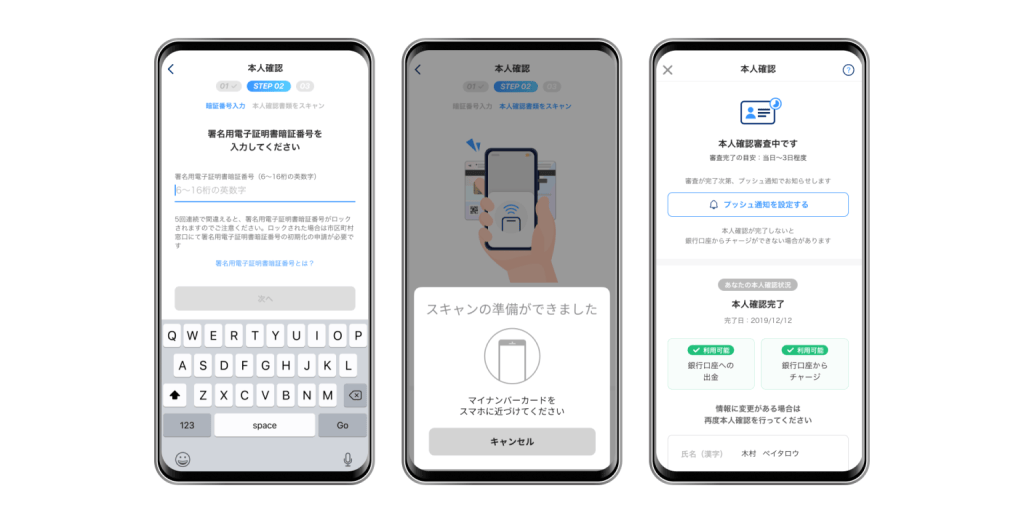
Please note that an NFC-enabled smartphone is required to use this feature. Identity verification via JPKI is available starting from PayPay version 3.19.0. Update to the latest version of the app to try it out!