


At PayPay, our design team uses Figma for everything from initial sketches to final designs. However, we’ve struggled to clearly communicate complex user flows to non-designers like engineers and business teams.
To tackle this issue, our designer Nino came up with a new diagramming method to simplify complex flows. This article dives into how the “Ninode,” a name combining Nino and Node, works and what he has learned from developing it.

Nino(Chaturaphat Ngamaharat)
Design Department, Product Division
Hi! I’m Nino from Thailand. I have been working with various FinTech products in the past few years. In November 2023 I decided to join PayPay and relocated to Japan. Now I’m enjoying a long cycling trip in Japan every week, so many things to explore here!
Agenda
A Diagram that Fixes Flowchart Weaknesses
First off, what exactly is a Ninode?
Ninode is a diagram designed to manage multiple decision points (like when a user has to choose between yes/no) that come up when designing complex user flows.
Using Ninode, you can neatly summarize 2-5 choices, making even the most complicated user flows easy to understand. We achieve this by using clear headings, color-coding, and size differentiation to help viewers grasp the structure subconsciously.

This is an example of how we use decision nodes in mundane tasks. In order to have high level information we need to look around for everything back and forth.
However, Ninode organizes high-level information. It saves space and provides more clarity on scenario paths and steps.
As you can see in the examples above, flow charts only allow us to think in the dimension of 2 choices per thinking, not multiple logic. Ninode gives the reader better understanding from a simple to holistic view, meanwhile flow charts require a lot of mental effort when numbers of decision nodes are multiplied.
What were the challenges before developing Ninode?
Generally, flowcharts are used to visualize user flows. But, as mentioned before, flowcharts are weak for designing intricate flows, and they tend to be difficult to understand in PayPay, where complex user flows are often designed.
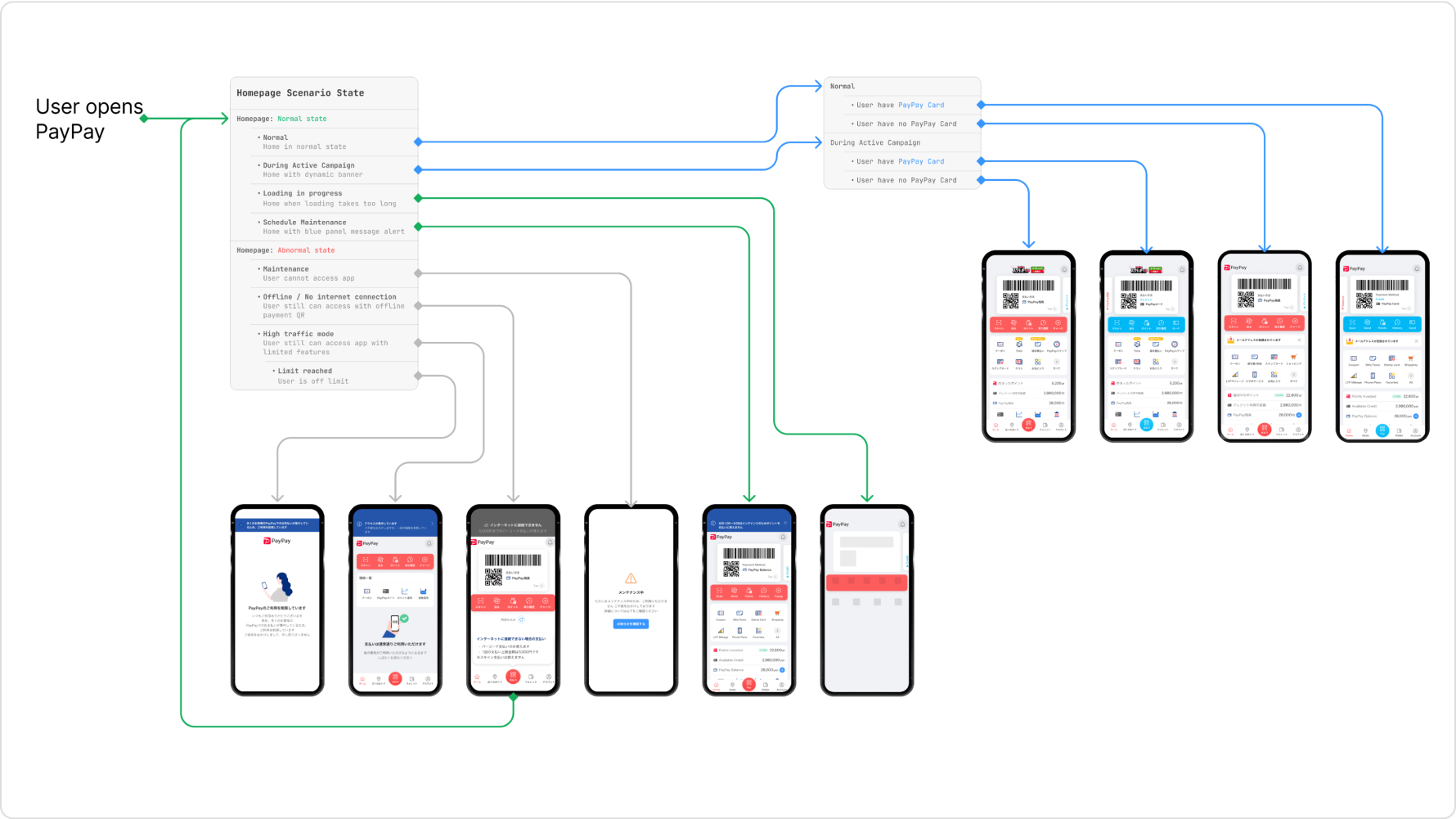
For example, turning the user experience after launching the PayPay app into a flowchart results in a tangled mess as shown below.

How did you develop Ninode as a designer?
Before becoming a product designer, I worked as a product manager (PdM), so I was already familiar with the strengths and weaknesses of flowcharts. When I discovered FigJam’s component feature, I got curious and thought, “Could this feature fix flowchart weaknesses?” That curiosity led me to prototype Ninode.
At my previous company a few years ago, I tested early prototypes of Ninode, which included elements from sequence diagrams and mermaid diagrams, with developers. The beta test received positive feedback, reducing the time spent explaining things to developers and improving departmental efficiency.
Later, I shared Ninode with s from our design team, who then shared it with the entire team, leading to its full-scale development at PayPay. After gathering feedback from other designers, we officially introduced Ninode to the team in May 2024.
Using Ninode Beyond PayPay
How should we use Ninode?
When using Ninode, start by setting a core node and identify common elements in each process to build the flow. For example, in the PayPay login process, the core node is “Logging into PayPay.” Before logging in, there’s a verification process for user ID, password, and one-time password. By organizing these into a single flow, you get a clear sequence like the diagram on the bottom.

What if I want to use Ninode at my company?
Ninode isn’t a special diagram. Anyone with some Figma skills can give it a try. I recommend starting with your own projects. You can introduce it in complex projects where Ninode excels or use it in simpler projects as a flowchart alternative.
Seeing Ninode improve work efficiency might encourage others to adopt it. After I shared Ninode at PayPay, several designers started using it in their work. PayPay’s designers are proactive about adopting efficiency-boosting ideas, creating a motivating environment for developers.

Aiming for a User-Friendly Diagram
Do you feel the impact of implementing Ninode?
As mentioned earlier, it positively affects both designers and non-designers. For designers, it reduces the time spent answering design-related questions. Thanks to the clear diagrams, we avoid repeatedly answering the same questions. Now, we have more time for other creative tasks. It also helps organize design files; for instance, I once reduced the number of screens in another designer’s Figma from around 200 to below 80.
For non-designers, developers use it to accurately understand product specifications and design. Project managers (PjMs) find it useful for discussing designs with designers and understanding existing user flows, while the quality assurance (QA) team finds it handy for checking design quality.
Lastly, what’s your vision for Ninode moving forward?
I don’t think Ninode is yet a universally accessible diagram. While it’s user-friendly for me, feedback from other designers revealed that many think differently. For example, what’s intuitive for me might be confusing for others.
However, I’m grateful for the environment where talented designers provide feedback on Ninode. They point out flaws I might not notice, helping us improve Ninode to make it more user-friendly for everyone.
As a first step toward improvement, I plan to develop high-quality guidelines for Ninode so other designers can start using it smoothly. Learning how to create these guidelines is necessary, but contributing to the design team is my mission and growing through this learning process excites me.
Current job openings
*Job openings and employee affiliations are current as of the time of the interview.